The Doing Social Studies video series and accompanying video guides are now available on the Minnesota Department of Education website. These videos offer explanations and strategies for teaching the social studies content, concepts and skills in the standards and benchmarks. Watch these videos to help with curriculum writing and instruction during the 2016-17 school year.
For more information about the Doing Social Studies videos, please contact Jessica Winkelaar(jessica.winkelaar@state.mn.us).
Showing posts with label video. Show all posts
Showing posts with label video. Show all posts
Friday, September 16, 2016

Friday, January 22, 2016
Tech Tip of the Week - EDpuzzle
EDpuzzle
 EDpuzzle is a great webtool to use if you use web videos in your classroom. You can use a video created by someone else, or create your own. With EDpuzzle, you are able to add questions, audio, and other aspects to your video. The teacher is then able to track how their students are doing with the questions and their progress through the video.
EDpuzzle is a great webtool to use if you use web videos in your classroom. You can use a video created by someone else, or create your own. With EDpuzzle, you are able to add questions, audio, and other aspects to your video. The teacher is then able to track how their students are doing with the questions and their progress through the video.
Friday, December 18, 2015
Tech Tip- Appear.in
Appear.in
If you are looking to videochat with 1 or 7 other people, Appear.in is a great way to do this. The best part about Appear.in is that there are no logins or creating accounts, even for the person creating the room. There is a screen sharing capability as well as an onscreen chat. Appear.in also works on a tablet or smartphone by installing the app. This would be an easy and efficient way to host a meeting with colleagues over distance. You could also use Appear.in to connect with a homebound student. It's free, no login, give it a try today!

If you are looking to videochat with 1 or 7 other people, Appear.in is a great way to do this. The best part about Appear.in is that there are no logins or creating accounts, even for the person creating the room. There is a screen sharing capability as well as an onscreen chat. Appear.in also works on a tablet or smartphone by installing the app. This would be an easy and efficient way to host a meeting with colleagues over distance. You could also use Appear.in to connect with a homebound student. It's free, no login, give it a try today!
Friday, January 16, 2015
Technology Tip - Appear.in
Appear.in
Appear.in is a great video conferencing website and/or app. The site allows up to 8 people to video chat at once. There is no login or installing required! The quality is great. All you need is a camera and a microphone. It's almost too easy! This could be an option for an online class, or for a student that has been absent for an extended period. It could also be used personally as well to make video calls. It also works from an iPad or iPhone through their app. And it's all free!

Appear.in is a great video conferencing website and/or app. The site allows up to 8 people to video chat at once. There is no login or installing required! The quality is great. All you need is a camera and a microphone. It's almost too easy! This could be an option for an online class, or for a student that has been absent for an extended period. It could also be used personally as well to make video calls. It also works from an iPad or iPhone through their app. And it's all free!
Thursday, April 17, 2014
Tech Tip
Google Hangouts
If you are looking for a way to connect multiple classrooms via a video chat, look no further than Google Hangouts! If you already have a Google account, you more than likely already have the ability to chat using Google Hangouts. Unlike Skype, Hangouts allow for multiple people to be video chatting at one time on the same screen. You can get the same feature from Skype, but there is a cost associated with upgrading to this feature. NASA has a very active Google Hangouts page and allows you to connect your students with astronauts or even visit with someone in space. President Obama has also used the Hangouts as a way to connect with people. He recently completed a chat with people from all around the country. Google Hangouts would be a great way to share a guest speaker with your colleagues or even with a friend or classroom miles away.
Google Hangout Tutorial Video
NASA on Google+

If you are looking for a way to connect multiple classrooms via a video chat, look no further than Google Hangouts! If you already have a Google account, you more than likely already have the ability to chat using Google Hangouts. Unlike Skype, Hangouts allow for multiple people to be video chatting at one time on the same screen. You can get the same feature from Skype, but there is a cost associated with upgrading to this feature. NASA has a very active Google Hangouts page and allows you to connect your students with astronauts or even visit with someone in space. President Obama has also used the Hangouts as a way to connect with people. He recently completed a chat with people from all around the country. Google Hangouts would be a great way to share a guest speaker with your colleagues or even with a friend or classroom miles away.
Google Hangout Tutorial Video
NASA on Google+
Friday, September 20, 2013
Resource
MN Video Vault
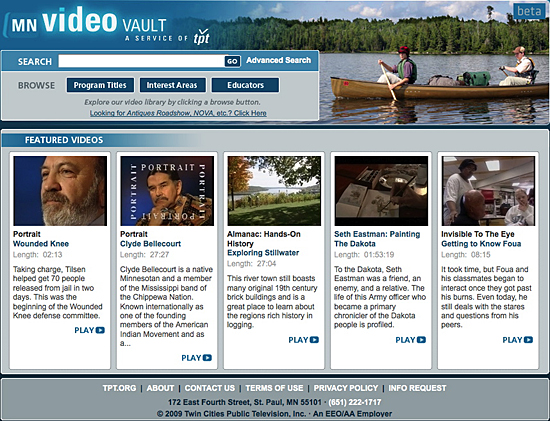 The MN Video Vault is a project of Twin Cities Public Television. The Vault contains hundreds of programs from the tpt archives: classic interviews and performances from Nighttimes Variety, Newsnight Minnesota and Almanac as well as a broad cross-section of tpt documentaries. Also included are current tpt productions, as well as programs from other regional public television stations. And soon, the MN Video Vault will feature new web-only tpt productions.
All of the material in the MN Video Vault is fully searchable. Programs have been broken into segments and tagged with key information to make specific videos easy to locate. In addition, all of the material is closed-captioned and, through advanced search functions, these captions can be searched to locate any word spoken within a program. Finally, many of the video segments will be tagged to relevant Minnesota State Academic Standard benchmarks, to facilitate classroom use.
Ultimately, the MN Video Vault will provide a platform for the preservation, digitization, cataloging, tagging and presentation of video material from the archives of regional museums, educational institutions, historical societies and other institutions.
All of the material in the MN Video Vault is fully searchable. Programs have been broken into segments and tagged with key information to make specific videos easy to locate. In addition, all of the material is closed-captioned and, through advanced search functions, these captions can be searched to locate any word spoken within a program. Finally, many of the video segments will be tagged to relevant Minnesota State Academic Standard benchmarks, to facilitate classroom use.
Ultimately, the MN Video Vault will provide a platform for the preservation, digitization, cataloging, tagging and presentation of video material from the archives of regional museums, educational institutions, historical societies and other institutions.
Subscribe to:
Comments (Atom)